9. 만유인력
- 질량을 가진 모든 물체에는 중력이 생성돼요.
-
- : 중력상수.
- : 객체1에서 객체2로 나아가는 방향의 단위 벡터
- : 물체 사이 거리를 제곱한 값. 사이 거리가 커질수록 중력이 제곱으로 약해 지죠.
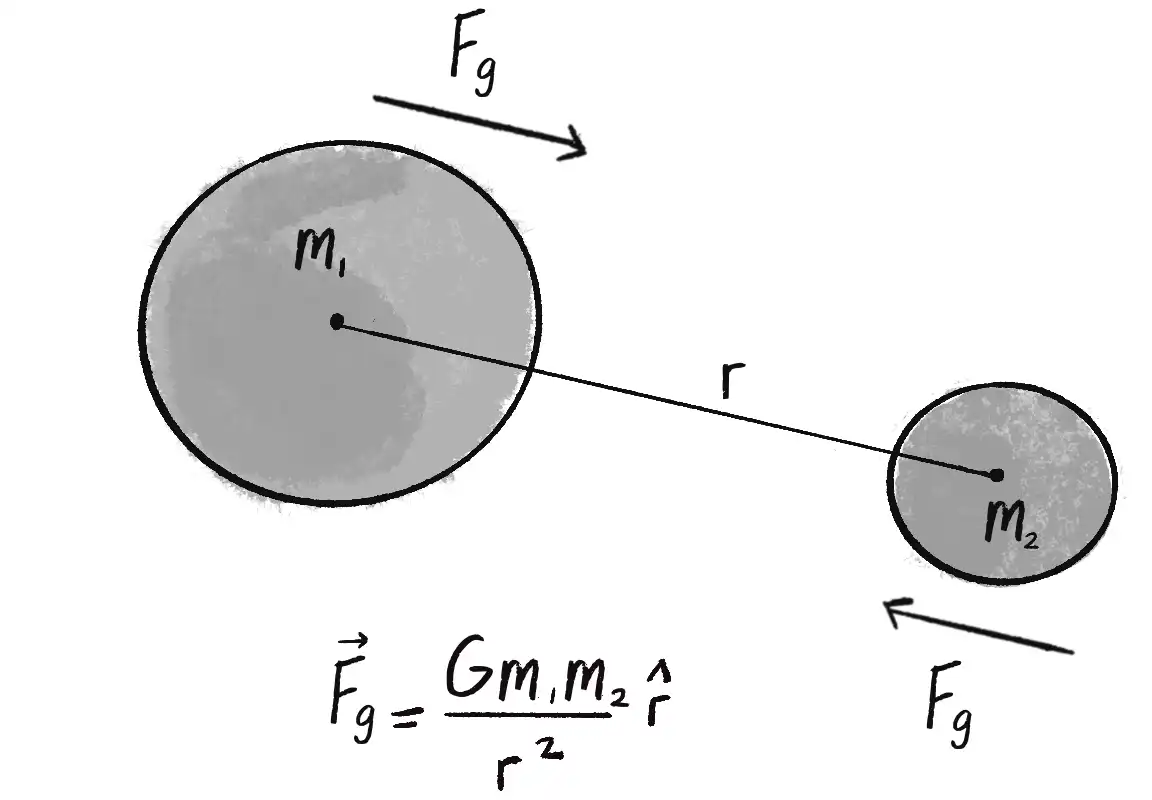
마우스 위치를 향하는 벡터
// 벡터 방향
const force = p5.Vector.sub(mouse, location);
const distance = force.magnitude();
force.normalize();

// 벡터 크기
const magnitude = (G * mass1 * mass2) / (distance * distance);
force.mult(magnitude);
Attractor 클래스 정의
class Attractor {
  constructor() {
    this.location = createVector(width / 2, height / 2);
    this.mass = 20;
  }

  display() {
    stroke(0);
    fill(175, 200);
    circle(this.position.x, this.position.y, this.mass * 2);
  }
}
- Mover, Attractor 객체 그려 봅시다.
let mover;
let attractor;

function setup() {
  createCanvas(640, 360);
  mover = new Mover(300, 100, 5);
  attractr = new Attractor();
}

function draw() {
  background(255);
  attractor.display();

  mover.update();
  mover.display();
}
Mover, Attractor 클래스 간 상호작용 구현
-
여러 구현방법이 존재합니다.
-
객체 지향적 관점에서 1번 방법은 사용하지 않는 것이 좋아요.
-
2, 3번은 관계를 어떤 관점에서 보느냐에 따라 명칭이 달라집니다.
-
따라서 4번이 가장 적절해요.
기능 함수 1 매개변수로 Attractor, Mover를 받는 함수를 만드는 방법 attraction(a,m) 2 Attractor 클래스의 함수에서 매개변수로 Mover를 받는 함수를 만드는 방법 a.attract(m) 3 Mover 클래스의 함수에서 매개변수로 Attractor를 받는 함수를 만드는 방법 m.attractedTo(a) 4 Attractor 클래스에 Mover 객체를 매개변수로 넣으면 중력 벡터를 구하는 함수를 만들 수 있음. 그리고 계산된 중력 벡터를 applyForce() 함수에 넣어서 중력을 적용하는 방법 m.applyForce(f) -
4번 방법으로 두 객체 사이의 중력 생성해요.
const force = attractor.attract(mover);
mover.applyForce(force);
function draw() {
  background(255);

  const force = attractor.attract(mover);
  mover.applyForce(force);
  mover.update();

  attractor.display();
  mover.display();
}
attract(mover){
// 중력 벡터의 방향 계산
const force = p5.Vector.sub(this.location, mover.location);

const distance = force.mag();
force.normalize();

// 중력 벡터의 크기 계산
const strength = (G*mass*mover.mass) / (distance*distance)
force.mult(strength);

return force;
}
제약사항 추가
- 거리(distance)가 0이면 분모가 될 수 없어요.
- 또한 지나치게 떨어져 있을 경우 힘이 너무 약하게 적용될 것입니다.
- 두 물체 사이의 거리가 5픽셀 이하 혹은 25 픽셀 이상이라면 제한하는 코드 추가해 요.
distance = constrain(distance, 5, 25);
예제 코드 2.6: 하나의 객체 끌어들이기
let mover;
let attractor;
let G = 1.0;

function setup() {
  createCanvas(640, 240);
  mover = new Mover(300, 50, 2);
  attractor = new Attractor();
}

function draw() {
  background(255);

  let force = attractor.attract(mover);
  mover.applyForce(force);

  mover.update();
  attractor.show();
  mover.show();
}

class Attractor {
  constructor() {
    this.position = createVector(width / 2, height / 2);
    this.mass = 20;
  }

  attract(mover) {
    let force = p5.Vector.sub(this.position, mover.position);
    let distance = force.mag();
    distance = constrain(distance, 5, 25);

    let strength = (G * this.mass * mover.mass) / (distance * distance);
    force.setMag(strength);
    return force;
  }

  show() {
    stroke(0);
    fill(175, 200);
    circle(this.position.x, this.position.y, this.mass * 2);
  }
}
- 위 코드에서 Mover, Attractor의 지름은 각 물체의 질량에 따라 조정됩니다.
- 원의 면적:
- 면적에 따른 질량을 더 정확히 표현하려면 실제 질량의 제곱근을 취하고, 이를 원의 지름으로 조정합니다.
:::info[연습문제 2.11] 예제 코드 2.6에서 Attract, Mover의 질량을 면적에 대응시켜 봅시다.
circle(this.position.x, this.position.y, sqrt(this.mass) * 2);
:::
예제 코드 2.7: 다수 Mover의 중력 끌림
let movers = [];
let attractor;

function setup() {
  createCanvas(640, 360);
  for (let i = 0; i < 10; i++) {
    movers[i] = new Mover(random(width), random(height), random(0.5, 3));
  }
  attractor = new Attractor();
}

function draw() {
  background(255);
  attractor.show();
  for (let i = 0; i < movers.length; i++) {
    let force = attractor.attract(movers[i]);

    movers[i].applyForce(force);
    movers[i].update();
    movers[i].show();
  }
}
- Attractor 객체가 화면에 보이지 않게 하고, Mover 객체가 움직이는 궤적을 시각화 해 보아요. 그러면 클레이튼 커빗, 톰 카든이 만든 메트로팝 데님 프로젝트와 같은 모습을 볼 수 있습니다.
:::info[연습문제 2.12] 예제 코드 2.7에는 Mover 배열과 하나의 Attractor 객체가 존 재해요. Attractor도 다수인 경우를 구현해보아요. 또한 Attractor가 보이지 않게 만 들면 어떻게 될까요? Attractor 주위를 움직이는 물체의 흔적에서 패턴을 만들 수 있 을까요? :::
:::info[연습문제 2.13] 가까우면 약해지고, 멀면 강해지는 힘을 구현해보고, 척력 (repulsion force)도 적용해보아요. 척력이란 인력과 다르게 밀어내는 힘을 의미해요. 가능한 한 많은 힘을 생각해서 구현해보아요. :::
코드 전문 (참고용)
지금까지 배운 내용을 모두 적용한 코드 전문을 보려면 여기를 클릭하세요.