4. 벡터 연산
| 함수 | 설명 |
|---|---|
| add() | 덧셈 |
| sub() | 뺄셈 |
| mult() | 곱셈 |
| div() | 나눗셈 |
| mag() | 크기 |
| setMag() | 크기 지정 |
| normalize() | 방향이 같고, 단위 길이가 1인 벡터로 설정 |
| limit() | 크기가 매개변수로 넣은 최댓값을 넘을 때 줄여줌 |
| heading() | 2차원 벡터의 회전각 |
| rotate() | 2차원 벡터를 특정 각도 만큼 회전 |
| lerp() | 선형 보간법 사용 |
| dist() | 두 벡터의 유클리드 거리 |
| angleBetween() | 두 벡터의 각도 |
| dot() | 두 벡터의 내적 연산 |
| cross() | 두 벡터의 외적 연산 |
| random2D() | 임의의 2차원 벡터 생성 |
| random3D() | 임의의 3차원 벡터 생성 |
벡터 뺄셈
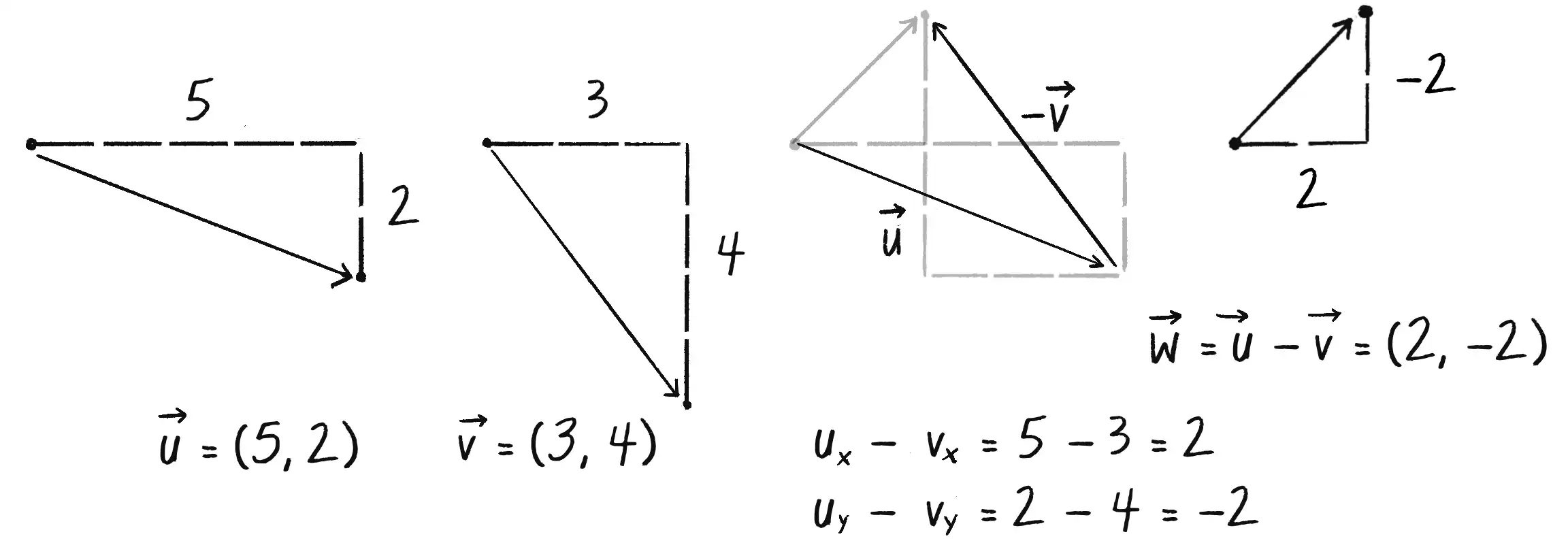
sub(v) {
  this.x = this.x - v.x;
  this.y = this.y - v.y;
}
-
마우스 위치와 화면 중심 좌표를 벡터로 만들고, 벡터 뺄셈 결과를 출력합니다.
function draw() {
  background(255);

  // 두 벡터 생성
  let mouse = createVector(mouseX, mouseY);
  let center = createVector(width / 2, height / 2);

  // 두 벡터 그리기
  strokeWeight(2);
  stroke(200);
  line(0, 0, mouse.x, mouse.y);
  line(0, 0, center.x, center.y);

  // 벡터 뺄셈
  mouse.sub(center);

  // 연산된 벡터 출력
  // 오리진(0,0)을 가운데로 이동시켜 출력
  // 오리진을 translate 하지 않으면 벡터가 기존 (0,0)에서 시작함
  stroke(0);
  translate(width / 2, height / 2);
  line(0, 0, mouse.x, mouse.y);
}
예제 코드 1.3: 벡터 뺄셈
- 벡터 연산은 고유한 translation이 이루어지는 것으로,
translate()을 이용해 위치 벡터의 오리진을 이동시켜줘야 합니다.
벡터 곱셈
- 일반적으로 벡터 곱셈은 크기 변환(스케일링) 연산을 의미합니다.
- 중요한 것은 벡터를 다른 벡터와 곱세하는 것이 아니라 스칼라와 곱셈을 한다는 개념입니다.
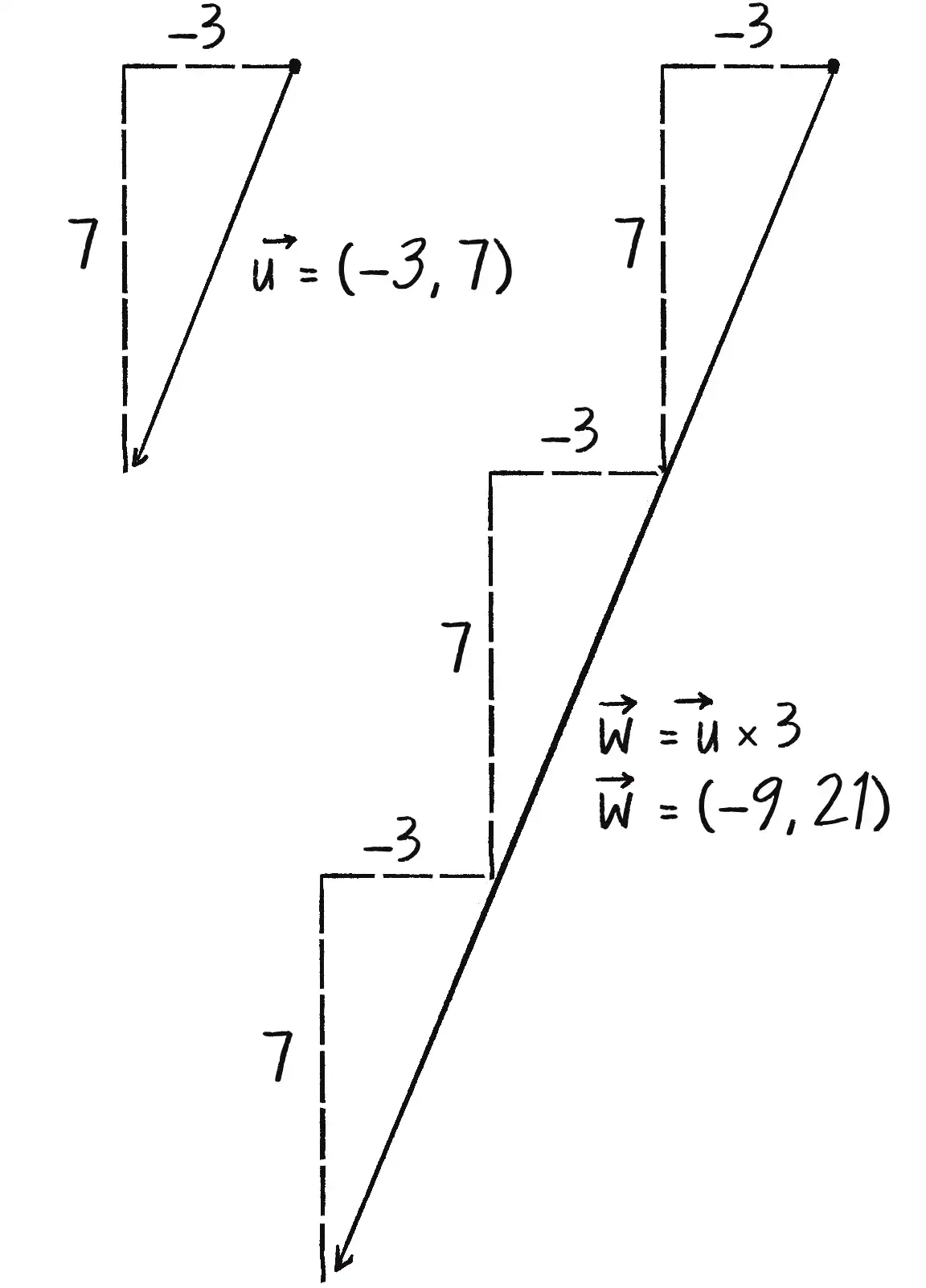
mult(n) {
  this.x = this.x * n;
  this.y = this.y * n;
}
function draw() {
  background(255);

  let mouse = createVector(mouseX, mouseY);
  let center = createVector(width / 2, height / 2);
  mouse.sub(center);

  translate(width / 2, height / 2);
  strokeWeight(2);
  stroke(200);
  line(0, 0, mouse.x, mouse.y);

  // 벡터 곱셈 (크기가 1/4이 됨)
  mouse.mult(0.25);

  stroke(0);
  strokeWeight(4);
  line(0, 0, mouse.x, mouse.y);
}
예제 코드 1.3: 벡터 곱셈
벡터 나눗셈
- 벡터 곱셈과 같은 방식으로 작동합니다.
div(n){
  this.x = this.x / n;
  this.y = this.y / n;
}